
Power windows
WARNING
● Make sure that all passengers have their hands, etc. inside the vehicle while it is in motion and before closing the windows. Use the window lock switch to prevent unexpected use of the power windows.
● Do not leave children unattended inside the vehicle. They could unknowingly activate switches or controls and become trapped in a window. Unattended children could become involved in serious accidents.
The power windows operate when the ignition switch is placed in the ON position, or for about 45 seconds after the ignition switch is placed in the OFF position. If the driver’s or passenger’s door is opened during this period of about 45 seconds, power to the windows is canceled.
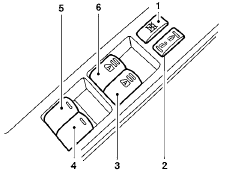
1. Window lock button
2. Power door lock switch
3. Front passenger side (automatic switch,
if so equipped)
4. Right rear passenger side (sedan only)
5. Left rear passenger side (sedan only)
6. Driver side automatic switch
Driver’s side power window switch
The driver’s side control panel is equipped with switches to open or close all of the windows. To open a window, push the switch to the first detent and continue to hold down until the desired window position is reached. To close a window, pull the switch to the first detent and continue to hold up until the desired window position is reached.
See also:
F.M.V.S.S./C.M.V.S.S. certification label
The Federal/Canadian Motor Vehicle Safety
Standard (F.M.V.S.S./C.M.V.S.S.) certification label
is affixed as shown. This label contains valuable
vehicle information, such as: Gross Vehicle
W ...
Brakes
If the brakes do not operate properly, have the
brakes checked by a NISSAN dealer. ...
Compass display
Compass display
Push the button for about 1 second when
the ignition switch is placed in the ON position to
toggle the outside temperature and compass
direction display on or off. The display ...