
Using the panic alarm
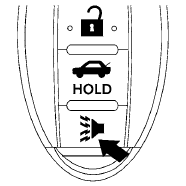
If you are near your vehicle and feel threatened,
you may activate the panic alarm to call attention
by pressing and holding the  button
on the
Intelligent Key for longer than 0.5 seconds.
button
on the
Intelligent Key for longer than 0.5 seconds.
The panic alarm and headlights will stay on for 25 seconds.
The panic alarm stops when:
● It has run for 25 seconds, or
● Any button is pressed on the Intelligent Key.
● Pushing the request switch on the driver or
passenger door with the Intelligent Key in
range of the door handle.
See also:
Anti-freeze
In the winter when it is anticipated that the
outside temperature will drop below 328F (08C),
check the anti-freeze to assure proper winter
protection. For additional information, see “Engine ...
Keys
A key number plate is supplied with your keys.
Record the key number and keep it in a safe
place (such as your wallet), not in the vehicle. If
you lose your keys, see a NISSAN dealer for
duplic ...
Vehicle identification number (chassis number)
The vehicle identification number is located as
shown.
Remove the cover to access the number. ...