
Locking doors
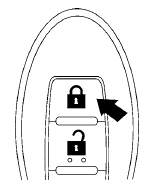
1. Place the ignition switch in the LOCK position.
2. Close all doors.
3. Press the  button on the
Intelligent
Key.
button on the
Intelligent
Key.
4. The hazard warning lights flash twice and
the horn beeps once.
5. All doors will be locked.
CAUTION
After locking the doors using the Intelligent Key, be sure that the doors have been securely locked by operating the door handles.
See also:
Locking with inside lock knob
Locking with inside lock knob
To lock the door without the key, move the inside
lock knob to the lock position 1 then close the
door.
To unlock, move the inside lock knob to the
unlock posit ...
Accelerator downshift — in D position —
For passing or hill climbing, depress the accelerator
pedal to the floor. This shifts the transmission
down into a lower gear, depending on the
vehicle speed. ...
Getting started
The following procedures will help you get
started using the Bluetooth Hands-Free Phone
System with NISSAN Voice Recognition. For additional
command options, refer to List of voice
commands in ...