
Using the panic alarm
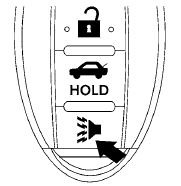
If you are near your vehicle and feel threatened,
you may activate the panic alarm to call attention
by pressing and holding the  button
on the
Intelligent Key for longer than 0.5 seconds.
button
on the
Intelligent Key for longer than 0.5 seconds.
The panic alarm and headlights will stay on for 25 seconds.
The panic alarm stops when:
● It has run for 25 seconds, or
● Any button is pressed on the Intelligent Key.
See also:
Safety
All-disc antilock brakes with electronic brake-force distribution and brake
assist are standard. Side-impact airbags and side curtain-type airbags that
protect outboard occupants in all three rows ...
Request Switches
WARNING
● Radio waves could adversely affect electric
medical equipment. Those who use a
pacemaker should contact the electric
medical equipment manufacturer for the
possible influences bef ...
Auto-reverse function (if so equipped)
There are some small distances immediately
before the closed position which
cannot be detected. Make sure that all
passengers have their hands, etc., inside
the vehicle before closing the ...