
Loose Fuel Cap warning
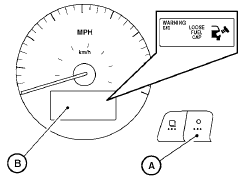
The LOOSE FUEL CAP warning appears in the vehicle information display when the fuel-filler cap is not tightened correctly after the vehicle has been refueled. It may take a few driving trips for the message to be displayed. To turn off the warning, perform the following:
1. Remove and install the fuel-filler cap as soon as possible. See “Fuel-filler cap”.
2. Tighten the fuel-filler cap until it clicks.
3. Press the  next button A on
the instrument
panel located behind the steering
wheel for about 1 second to turn off the
LOOSE FUEL CAP warning B after tightening
the fuel-filler cap.
next button A on
the instrument
panel located behind the steering
wheel for about 1 second to turn off the
LOOSE FUEL CAP warning B after tightening
the fuel-filler cap.
See also:
Vehicle loading information
- It is extremely dangerous to ride
in a cargo area inside the vehicle.
In a collision, people riding
in these areas are more likely to
be seriously injured or killed.
- Do not allow peopl ...
How to read the displayed lines
Guiding lines which indicate the vehicle width
and distances to objects with reference to the
vehicle body line (A) are displayed on the monitor.
Distance guide lines:
Indicate distances from ...
Under the Hood
Base engine is a 152-horsepower, 2.5-liter, dual-overhead-camshaft
inline-four-cylinder that makes 171 pounds-feet of torque, mated to a five-speed
manual transmission
261-hp, 4.0-liter, dual-ove ...