
Compact disc (CD) with MP3 or WMA (models without Navigation System)
Terms:
● MP3 — MP3 is short for Moving Pictures Experts Group Audio Layer 3. MP3 is the most well-known compressed digital audio file format. This format allows for near “CD quality” sound, but at a fraction of the size of normal audio files. MP3 conversion of an audio track from CD-ROM can reduce the file size by approximately a 10:1 ratio with virtually no perceptible loss in quality. MP3 compression removes the redundant and irrelevant parts of a sound signal that the human ear doesn’t hear.
● WMA—Windows Media Audio (WMA)* is a compressed audio format created by Microsoft as an alternative to MP3. The WMA codec offers greater file compression than the MP3 codec, enabling storage of more digital audio tracks in the same amount of space when compared to MP3s at the same level of quality.
● Bit rate — Bit rate denotes the number of bits per second used by a digital music file. The size and quality of a compressed digital audio file is determined by the bit rate used when encoding the file.
● Sampling frequency — Sampling frequency is the rate at which the samples of a signal are converted from analog to digital (A/D conversion) per second.
● Multisession — Multisession is one of the methods for writing data to media. Writing data once to the media is called a single session, and writing more than once is called a multisession.
● ID3/WMA Tag — The ID3/WMA tag is the part of the encoded MP3 or WMA file that contains information about the digital music file such as song title, artist, encoding bit rate, track time duration, etc. ID3 tag information is displayed on the Artist/song title line on the display.
* Windows and Windows Media are registered trademarks and trademarks in the United States of America and other countries of Microsoft Corporation of the USA.
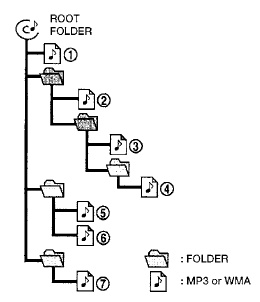
Playback order chart
Playback order:
Music playback order of a CD with MP3 or WMA files is as illustrated.
● The names of folders not containing MP3 or WMA files are not shown in the display.
● If there is a file in the top level of the disc, “Root Folder” is displayed.
● The playback order is the order in which the files were written by the writing software. Therefore, the files might not play in the desired order.
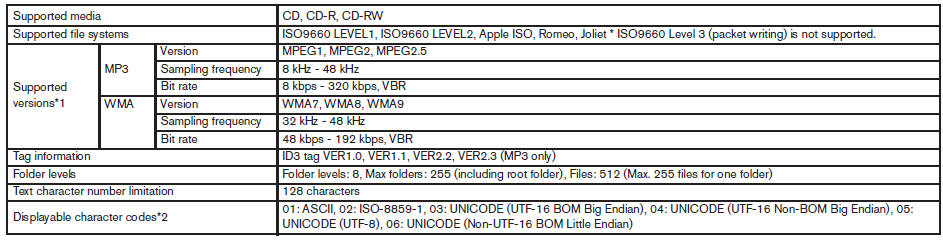
Specification chart:
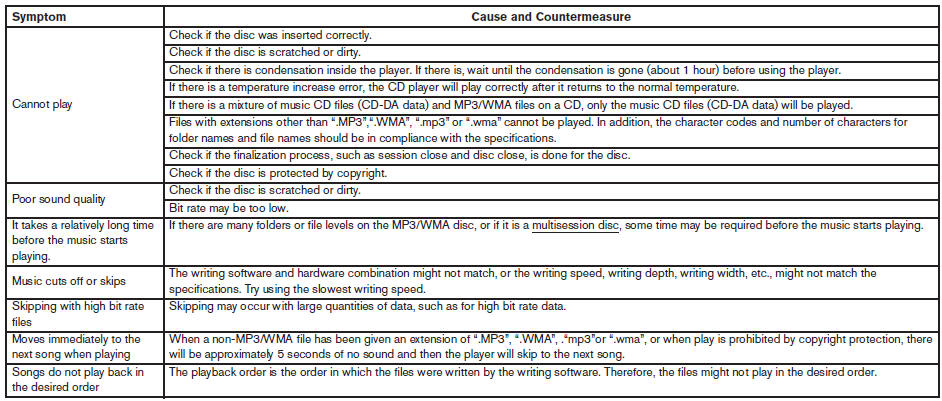
Troubleshooting guide:
See also:
Front seat-mounted side-impact
supplemental air bag and roofmounted
curtain side-impact
supplemental air bag systems
The side air bags are located in the outside of the
seatback of the front seats. The curtain air bags
are located in the side roof rails. These systems
are designed to meet voluntary guidelines t ...
Latch lower anchor
WARNING:
Failure to follow the warnings and instructions
for proper use and installation of
child restraints could result in serious injury
or death of a child or other passengers
in a sudden ...
Engine compartment check locations
QR25DE engine
1. Power steering fluid reservoir
2. Engine oil filler cap
3. Brake fluid reservoir/Clutch fluid
reservoir (M/T model)
4. Air cleaner
5. Fuse block
6. Battery
7. Fuse/Fusible l ...