
Alternate Command Mode command list
Phone Command:

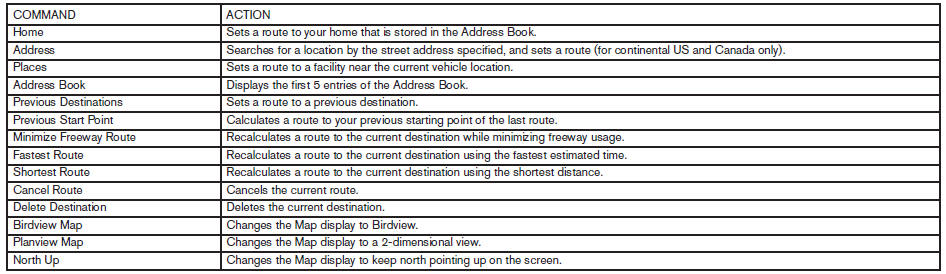
Navigation Command:

Information Command:

Audio Command:

See also:
Tire pressures
● When towing a trailer, inflate the vehicle
tires to the recommended cold
tire pressure indicated on the Tire
and Loading Information label.
● Trailer tire condition, size, load ra ...
Adjusting the screen (models with Navigation System)
Adjusting the screen (models with Navigation System)
To adjust the quality of the screen, perform the
following.
1. Press the SETUP button.
2. Touch “System”.
3. Touch “Display”.
4. ...
Uniform tire quality grading
DOT (Department Of Transportation) Quality
Grades: All passenger car tires must conform to
federal safety requirements in addition to these
grades.
Quality grades can be found where applicable ...