
Installing front license plate
Nissan Altima / Nissan Altima Owners Manual / Technical and consumer information / Installing front license plate
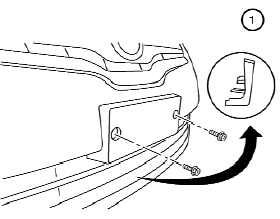
To mount the front license plate, attach the license plate bracket 1 to the plastic finisher at the location marks (small dimples) using the two 6 mm screws provided.
See also:
Wheels and tires
If you have a flat tire, see “Flat tire” in the
“In case of emergency” section of this
manual. ...
Interior changes
Most of the changes inside the cabin of both Nissan Navara and Pathfinder
have been designed to boost quality and include new switchgear, revised door
trims, new seat fabric, the addition of chrom ...
Connecting iPod
To connect an iPod to the vehicle so that the
iPod can be controlled with the audio system
controls and display screen, use the USB jack
located in the center console. Open the protective
co ...