
Locking with key
Driver’s side
Manual (if so equipped)
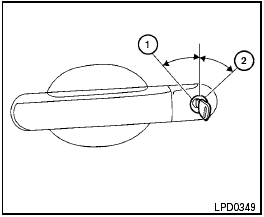
To lock a door, turn the key toward the front of the vehicle 1 . To unlock, turn the key toward the rear 2 .
Power (if so equipped)
The power door lock system allows you to lock or unlock all doors at the same time.
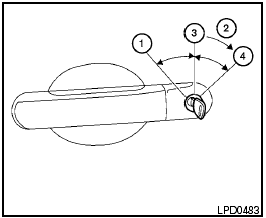
Turning the key toward the front 1 of the vehicle locks all doors.
Turning the key one time toward the rear 2 of the vehicle unlocks that door. From that position, returning the key to neutral 3 (where the key can only be removed and inserted) and turning it toward the rear again within 5 seconds unlocks all doors 4 .
See also:
Floor mat positioning aid
This vehicle includes a front floor mat bracket to
act as a floor mat positioning aid. Genuine
NISSAN floor mats have been specially designed
for your vehicle model. The driver’s and passengerâ ...
Wheels and tires
If you have a flat tire, see “Flat tire” in the
“In case of emergency” section of this
manual. ...
Scheduled maintenance
For your convenience, both required and optional
scheduled maintenance items are described
and listed in your “NISSAN Service and
Maintenance Guide”. You must refer to that
guide to ensure ...