
Audio main operation
Audio main operation
AUX button:
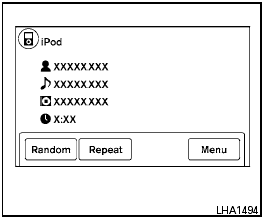
Place the ignition switch in the ACC or ON position and press the AUX button repeatedly until the iPod mode is displayed on the screen.
If another audio source is playing and the iPod is connected, press the AUX button repeatedly to switch to the iPod mode.
If the vehicle audio system is turned off while the iPod is playing, the iPod will start when the VOL/ON-OFF control knob is pressed.
Interface:
The interface for iPod operation shown on the
vehicle’s audio system display screen is similar to
the iPod interface. Use the touchscreen,
 BACK button or the TUNE/SCROLL knob to
navigate the menus on the screen.
BACK button or the TUNE/SCROLL knob to
navigate the menus on the screen.
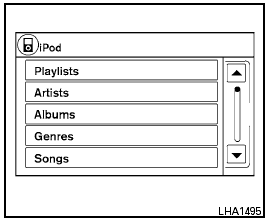
When the iPod is playing, touch the “Menu” key to bring up the iPod interface.
Depending on the iPod model, the following items may be available on the menu list screen.
For further information about each item, see the iPod Owner’s Manual.
● Playlists
● Artists
● Albums
● Genres
● Songs
● Composers
● Audiobooks
● Podcasts

SEEK/CATEGORY button:
Press the SEEK/CATEGORY button
 or
or  to
skip backward or forward one track.
to
skip backward or forward one track.
Press and hold the SEEK/CATEGORY
button  or
or
 for 1.5
seconds while a
track is playing to reverse or fast forward the track
being played. The track plays at an increased
speed while reversing or fast forwarding. When
the button is released, the track returns to normal
play speed.
for 1.5
seconds while a
track is playing to reverse or fast forward the track
being played. The track plays at an increased
speed while reversing or fast forwarding. When
the button is released, the track returns to normal
play speed.
Random and repeat play mode:
While the iPod is playing, the play pattern can be altered so that songs are repeated or played randomly.
Random:
Touch the “Random” key to apply a random play
pattern to the iPod . When the random mode is
active, the  icon is displayed to the left of
the song title or album name to denote which
random pattern is applied. To cancel Random
mode, touch the “Random” key until no
icon is displayed to the left of
the song title or album name to denote which
random pattern is applied. To cancel Random
mode, touch the “Random” key until no
 icon is displayed.
Repeat:
Touch the “Repeat” key to apply a repeat play
pattern to the iPod . When the repeat mode is
active, the  icon is displayed to the left of
the song title or album name to denote which
repeat pattern is applied. To cancel Repeat
mode, touch the “Repeat” key until no
icon is displayed to the left of
the song title or album name to denote which
repeat pattern is applied. To cancel Repeat
mode, touch the “Repeat” key until no
 icon
is displayed.
icon
is displayed.
See also:
Auto-reverse function (if so equipped)
There are some small distances immediately
before the closed position which
cannot be detected. Make sure that all
passengers have their hands, etc., inside
the vehicle before closing the ...
Parking brake reminder chime
The parking brake reminder chime will sound if
the vehicle is driven at more than 4 MPH (7
km/h) with the parking brake applied. Stop the
vehicle and release the parking brake. ...
Window antenna
The antenna pattern is printed inside the rear
window.
CAUTION
● Do not place metalized film near the
rear window glass or attach any metal
parts to it. This may cause poor reception
or no ...