
Jacking up vehicle and removing the damaged tire
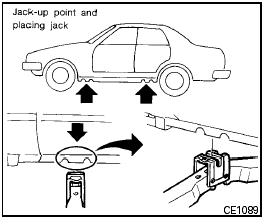
Jacking up vehicle and removing the damaged tire

● Never get under the vehicle while it is supported only by the jack. If it is necessary to work under the vehicle, support it with safety stands.
● Use only the jack provided with your vehicle to lift the vehicle. Do not use the jack provided with your vehicle on other vehicles. The jack is designed for lifting only your vehicle during a tire change.
● Use the correct jack-up points. Never use any other part of the vehicle for jack support.
● Never jack up the vehicle more than necessary.
● Never use blocks on or under the jack.
● Do not start or run the engine while vehicle is on the jack. It may cause the vehicle to move. This is especially true for vehicles with limited slip differentials.
● Do not allow passengers to stay in the vehicle while it is on the jack.
● Never run the engine with a wheel(s) off the ground. It may cause the vehicle to move.
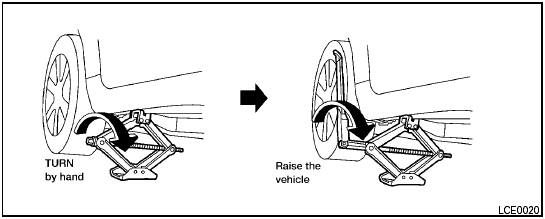
Always refer to the proper illustrations for the correct placement and jack-up points for your specific vehicle model and jack type.
Carefully read the caution label attached to the jack body and the following instructions.
1. Loosen each wheel nut one or two turns by turning counterclockwise with the wheel nut wrench. Do not remove the wheel nuts until the tire is off the ground. 2. Place the jack directly under the jack-up point as illustrated so the top of the jack contacts the vehicle at the jack-up point.
Align the jack head between the two notches in the front or the rear as shown.
Also fit the groove of the jack head between the notches as shown.
The jack should be used on firm and level ground.
3. To lift the vehicle, securely hold the jack lever and rod with both hands. Carefully raise the vehicle until the tire clears the ground. Remove the wheel nuts, and then remove the tire.
See also:
Battery replacement
Be careful not to allow children to swallow
the battery or removed parts. ...
Alternate Command Mode command list
Phone Command:
Navigation Command:
Information Command:
Audio Command:
...
Rear window defroster switch
For more information about the rear window defroster
switch, see “Rear window and outside
mirror defroster switch” in the “Instruments and
controls” section of this manual. ...