
Main power window switch (driver’s side)
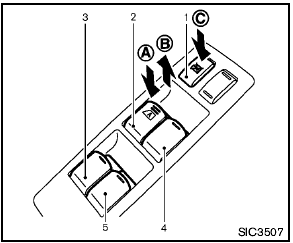
Main power window switch (driver’s side)
1. Window lock button
2. Driver side window
3. Rear left passenger side window
4. Front passenger side window
5. Rear right passenger side window
To open or close the window, push down A or pull up B the switch and hold it. The main switch (driver side switches) will open or close all the windows.
See also:
Engine compartment check locations
QR25DE engine
1. Power steering fluid reservoir
2. Engine oil filler cap
3. Brake fluid reservoir/Clutch fluid
reservoir (M/T model)
4. Air cleaner
5. Fuse block
6. Battery
7. Fuse/Fusible l ...
Injured persons
NISSAN recommends that injured persons use
seat belts. Check with your doctor for specific
recommendations. ...
Backing up on a steep downhill
When backing up the vehicle down a hill, the
distance guide lines and the vehicle width guide
lines are shown farther than the actual distance.
For example, the display shows 3 ft (1.0 m) to the
...