
FM-AM-SAT(if so equipped) radio with Compact Disc (CD) player (Type A)
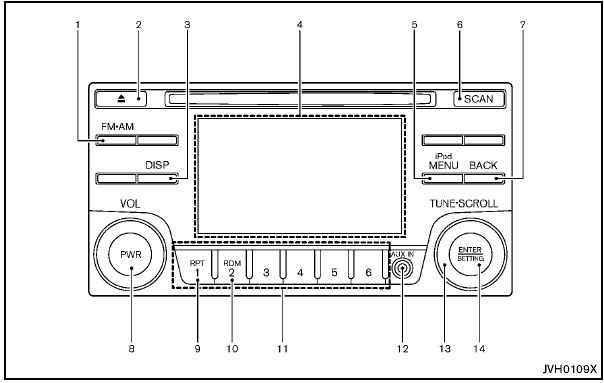
FM-AM-SAT(if so equipped) radio with Compact Disc
(CD) player (Type A)
1. FM·AM band select button
2. CD EJECT button
3. DISP (display) button
4. Color display
5. iPod® MENU button
6. Radio SCAN tuning button
7. BACK button
8. PWR (power) button/VOL (volume) control knob
9. RPT (repeat) play button
10. RDM (random) play button
11. Radio station preset select buttons
12. AUX IN jack
13. TUNE·SCROLL control knob
14. ENTER/SETTING button
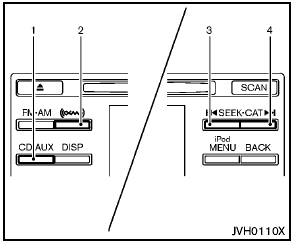
models with satellite radio
1. CD·AUX button
2. XM band select button
3. Radio CAT (category)/REW (rewind) button for
SEEK/TRACK
4. Radio CAT (category)/FF (fast forward) button for
SEEK/TRACK
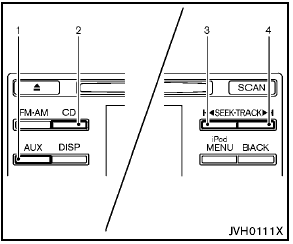
models without satellite radio
1. AUX button
2. CD button
3. REW (rewind) button for SEEK/TRACK
4. FF (fast forward) button for SEEK/TRACK
For all operation precautions, see “Audio operation precautions” earlier in this section.
For models with satellite radio:
- No satellite radio reception is available when
the SAT band option is selected unless the
optional satellite receiver and antenna are
installed, and there is an active XM Satellite
Radio subscription.
- The satellite radio mode requires an active XM Satellite Radio subscription. The satellite radio is not available in Alaska, Hawaii and Guam.
- It may take some time to receive the activation signal after subscribing the XM Satellite Radio. After receiving the activation signal, an available channel list will be automatically updated in the radio. For XM, place the ignition switch from LOCK to ACC to update the channel list.
See also:
Change intervals
The oil and oil filter change intervals for your
engine are based on the use of the specified
quality oils and filters. Using engine oil and filters
that are not of the specified quality, or exc ...
Continuously Variable
Transmission (CVT) check
warning light (if so equipped)
When the ignition switch is placed in the ON
position, the light comes on for about 2 seconds.
If the light comes on at any other time, it may
indicate the CVT system is not functioning properly. ...
Audio main operation
iPod button:
Place the ignition switch in the ACC or ON
position and press the iPod button to switch to
the iPod mode.
If another audio source is playing and the iPod is
connected, press the i ...