
Intelligent Key system (if so equipped)
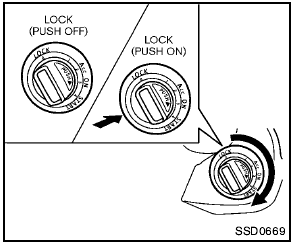
Intelligent Key system (if so equipped)
The Intelligent Key system can operate the ignition switch without taking the key out from your pocket or purse. The operating environment and/or conditions may affect the Intelligent Key system operation.

- Be sure to carry the Intelligent Key with you when operating the vehicle.
- Never leave the Intelligent Key inside the vehicle when you leave the vehicle.
- If the vehicle battery is discharged, the ignition switch cannot be moved from the LOCK position. Charge the battery as soon as possible. See “Jump starting” in the “6. In case of emergency” section.
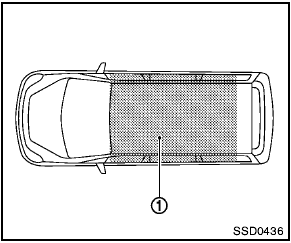
Operating range
The Intelligent Key functions can only be used for starting the engine when the Intelligent Key is within the specified operating range 1 .
When the Intelligent Key battery is almost discharged or strong radio waves are present near the operating location, the Intelligent Key system’s operating range becomes narrower and may not function properly.
If the Intelligent Key is within the operating range, it is possible for anyone, even someone who does not carry the Intelligent Key, to turn the ignition switch to start the engine.
- The cargo area is not included in the operating range, but the Intelligent Key may function.
- If the Intelligent Key is placed on the instrument panel, inside the glove box or door pocket, the Intelligent Key may not function.
- If the Intelligent Key is placed near the door or window outside the vehicle, the Intelligent Key may function.
Some indicators and warnings for operation are displayed on the vehicle information display between the speedometer and tachometer.
(See “Vehicle information display” in the “2.
Instruments and controls” section.)
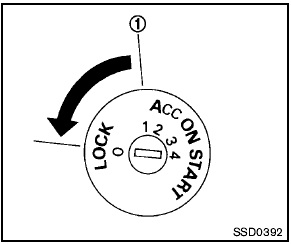
Without Intelligent Key system
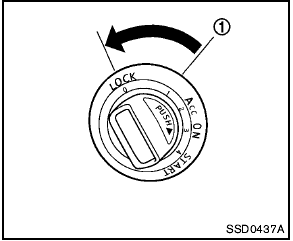
With Intelligent Key system
See also:
Self-test feature
The ABS includes electronic sensors, electric
pumps, hydraulic solenoids and a computer. The
computer has a built-in diagnostic feature that
tests the system each time you start the engine
and ...
Air conditioning system refrigerant and lubricant recommendations
The air conditioning system in your
NISSAN vehicle must be charged with the
refrigerant HFC-134a (R-134a) and the oil,
NISSAN A/C system oil Type S or the exact
equivalents.
The use of an ...
Interior trunk lid release
Interior trunk lid release
Closely supervise children when they are
around cars to prevent them from playing
and becoming locked in the trunk where
they could be seriously injured. Keep t ...