
Power windows
WARNING
● Make sure that all passengers have their hands, etc. inside the vehicle while it is in motion and before closing the windows. Use the window lock switch to prevent unexpected use of the power windows.
● Do not leave children unattended inside the vehicle. They could unknowingly activate switches or controls and become trapped in a window. Unattended children could become involved in serious accidents.
The power windows operate when the ignition switch is placed in the ON position, or for about 45 seconds after the ignition switch is placed in the OFF position. If the driver’s or passenger’s door is opened during this period of about 45 seconds, power to the windows is canceled.
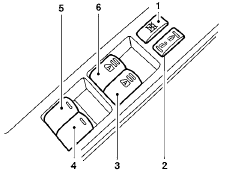
1. Window lock button
2. Power door lock switch
3. Front passenger side (automatic switch,
if so equipped)
4. Right rear passenger side (sedan only)
5. Left rear passenger side (sedan only)
6. Driver side automatic switch
Driver’s side power window switch
The driver’s side control panel is equipped with switches to open or close all of the windows. To open a window, push the switch to the first detent and continue to hold down until the desired window position is reached. To close a window, pull the switch to the first detent and continue to hold up until the desired window position is reached.
See also:
Vehicle identification number (chassis number)
The vehicle identification number is located as
shown. ...
Vacuum assisted brakes
The brake booster aids braking by using engine
vacuum. If the engine stops, you can stop the
vehicle by depressing the brake pedal. However,
greater foot pressure on the brake pedal will be
re ...
New for 2009
An all-new offroad trim clones the Titan's PRO-4X badge; it replaces the
Nismo offroad package on the 2008 Frontier. Many of the features are the same,
including Bilstein high-pressure shock absor ...