
Call volume
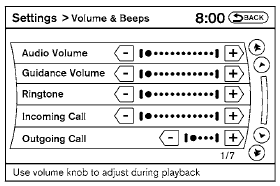
Adjusting the incoming or outgoing call volume may improve clarity if reception between callers is unclear.
● Incoming call—adjusting this setting allows you to hear a difference in volume.
● Outgoing call—adjusting this setting allows the person you are talking with to hear a difference in volume.
To access the settings, press the SETTING button, then select “Volume & Beeps”.
You can also adjust the volume of an incoming voice during a call by pushing the volume control switch on the steering wheel or by turning the volume control knob on the instrument panel.
See also:
How to use the setup button
When the SETUP button is pushed, the Setup
screen will appear on the display. You can select
and/or adjust several functions, features and
modes that are available for your vehicle.
Audio s ...
Air conditioner system (if so equipped)
refrigerant and oil recommendations
The air conditioner system in your NISSAN
vehicle must be charged with the refrigerant
HFC-134a (R-134a) and the oil, NISSAN
A/C system oil Type S or the exact equivalents.
The use of any o ...
Accelerator downshift
— in D position —
For passing or hill climbing, depress the accelerator
pedal to the floor. This shifts the transmission
down into a lower gear, depending on the
vehicle speed.
High fluid tem ...