
Releasing the trunk lid
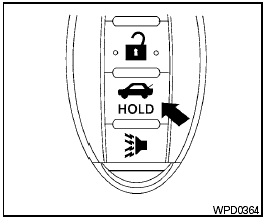
Releasing the trunk lid
Press the  button for longer than
0.5 seconds
to open the trunk lid. The trunk release
button will not operate when the ignition switch is
placed in the ON position.
button for longer than
0.5 seconds
to open the trunk lid. The trunk release
button will not operate when the ignition switch is
placed in the ON position.
See also:
Parking brake reminder chime
The parking brake reminder chime will sound if
the vehicle is driven at more than 4 MPH (7
km/h) with the parking brake applied. Stop the
vehicle and release the parking brake. ...
Three-way catalyst
The three-way catalyst is an emission control
device installed in the exhaust system. Exhaust
gases in the three-way catalyst are burned at
high temperatures to help reduce pollutants.
- Th ...
Initialization
When the ignition switch is placed in the ON
position, NISSAN Voice Recognition is initialized,
which takes a few seconds. If the button is
pressed before the initialization completes, the
sy ...