
Using the panic alarm
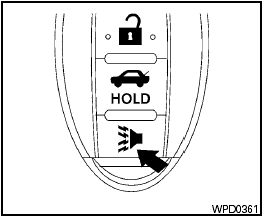
Using the panic alarm
If you are near your vehicle and feel threatened,
you may activate the panic alarm to call attention
by pressing and holding the  button on the
Intelligent Key for longer than 0.5 seconds.
button on the
Intelligent Key for longer than 0.5 seconds.
The panic alarm and headlights will stay on for 25 seconds.
The panic alarm stops when:
● It has run for 25 seconds, or
● Any button is pressed on the Intelligent Key.
● Pushing the request switch on the driver or
passenger door with the Intelligent Key in
range of the door handle.
See also:
Tilt/telescopic steering
WARNING:
Do not adjust the steering wheel while
driving. You could lose control of your
vehicle and cause an accident.
CAUTION:
Do not adjust the steering wheel any
closer to you than is nece ...
NISSAN Advanced Air Bag System
(front seats)
This vehicle is equipped with the NISSAN Advanced
Air Bag System for the driver and front
passenger seats. This system is designed to
meet certification requirements under U.S. regulations.
It ...
Headlight control switch
Lighting
Type A
Type B
(1) When turning the switch to the
position,
the front parking, tail, license plate and
instrument panel lights come on.
(2)- When turning the switch to the ...