
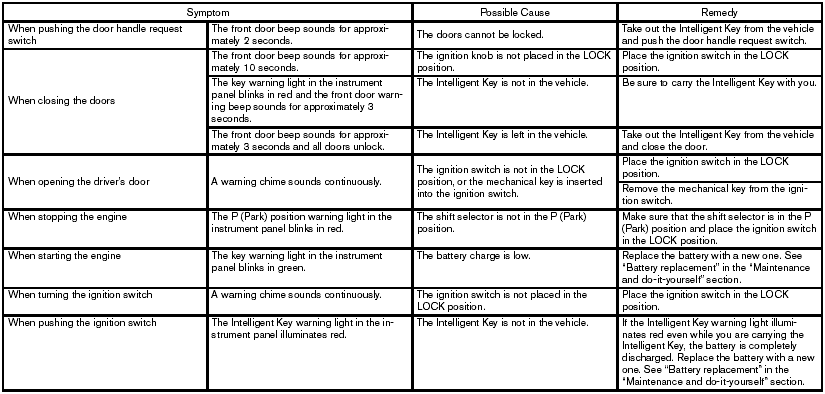
Troubleshooting guide
Nissan Sentra / Nissan Sentra Owners Manual / Pre-driving checks and adjustments / NISSAN Intelligent Key™ (if so equipped) / Troubleshooting guide
See also:
Three-way catalyst
The three-way catalyst is an emission control
device installed in the exhaust system. Exhaust
gases in the three-way catalyst are burned at
high temperatures to help reduce pollutants.
WARNING: ...
SOURCE select switch
With the ignition switch turned to the ACC or
ON position, push the SOURCE select switch
to turn the audio system on. Push the switch to
change the mode in the sequence of AM, FM,
SAT, CD, iPo ...
Precautions
Start the engine when using the DVD entertainment
system.
Movies will not be shown on the front display
while the vehicle is in any drive position to reduce
driver distraction. Audio is available ...