
Covered storage box
Nissan Altima / Nissan Altima Owners Manual / Instruments and controls / Storage / Covered storage box
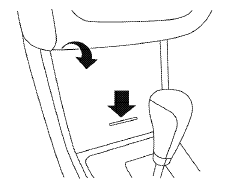
Push the center of the lid to open.
See also:
Parking/parking on hills
WARNING:
- Do not stop or park the vehicle over
flammable materials such as dry grass,
waste paper or rags. They may ignite
and cause a fire.
- Safe parking procedures require that
both th ...
Cargo cover (if so equipped)
Cargo cover (if so equipped)
The cargo cover keeps the contents in the cargo
area hidden from the outside.
To use the cargo cover, pull it out and hang both
sides on the hooks 1 .
To stow the ...
Changing a flat tire
If you have a flat tire, follow the instructions below:
Stopping the vehicle
1. Safely move the vehicle off the road and
away from traffic.
2. Turn on the hazard warning flashers.
3. Park on a l ...