
Locking with inside lock knob
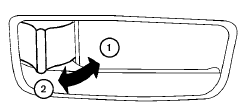
Inside lock
To lock the door without the key, move the inside lock knob to the lock position 1 , then close the door.
To unlock the door without the key, move the inside lock knob to the unlock position 2 .
See also:
How to use brightness control and display ON/OFF
button
To change the display brightness, push the
button. Pushing the button again will change the
display to the day or the night display.
If no operation is performed within 5 seconds,
the display ...
Overview
Nissan Juke is set to change the urban landscape... for the third time.
Following in the wheeltracks of the Murano large crossover and then the
successful Qashqai - the car that three years ago in ...
Backing up behind a projecting object
Backing up behind a projecting object
The position is shown farther than the position
B in the display. However, the position C is
actually at the same distance as the position A .
The vehicle ...