
How to use remote keyless entry function

- Radio waves could adversely affect electric medical equipment. Those who use a pacemaker should contact the electric medical equipment manufacturer for the possible influences before use.
- The Intelligent Key transmits radio waves when the buttons are pushed. The FAA advises that the radio waves may affect aircraft navigation and communication systems.
Do not operate the Intelligent Key while on an airplane.
Make sure the buttons are not operated unintentionally when the unit is stored during a flight.

- Do not allow the Intelligent Key, which contains electrical components, to come into contact with water or salt water. This could affect the system function.
- Do not drop the Intelligent Key.
- Do not strike the Intelligent Key sharply against another object.
- Do not change or modify the Intelligent Key.
- Wetting may damage the Intelligent Key. If the Intelligent Key gets wet, immediately wipe until it is completely dry.
- Do not place the Intelligent Key for an extended period in an area where temperatures exceed 1408F (608C).
- Do not attach the Intelligent Key with a key holder that contains a magnet.
- Do not place the Intelligent Key near equipment that produces a magnetic field, such as a TV, audio equipment, personal computers or cellular phone.
The remote keyless entry function can operate all door locks using the remote keyless entry function of the Intelligent Key. The remote keyless entry function can operate at a distance of approximately 33 ft (10 m) from the vehicle.
(The operating distance depends upon the
conditions around the vehicle.)
The remote keyless entry function will not
operate:
- When the Intelligent Key is not within the
operational range.
- When the doors are open or not closed securely.
- When the Intelligent Key battery is discharged.
The remote keyless entry function can also operate the vehicle alarm.
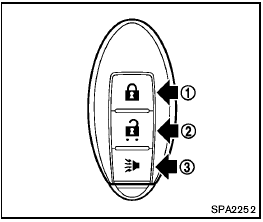
1 LOCK button 
2 UNLOCK button 
3 PANIC button 
When you lock or unlock the doors, the hazard indicator will flash and the horn (or the outside chime) will sound as a confirmation. For details, see “Setting hazard indicator and horn mode” later in this section.
See also:
Unlocking doors
1. Press the button on the
Intelligent
Key.
2. The hazard warning lights flash once.
3. Press the button again within 5
seconds
to unlock all doors.
All doors will be locked automatically ...
Unlocking doors
Unlocking doors
1. Press the button on the
Intelligent
Key.
2. The hazard warning lights flash once.
3. Press the button again within 60
seconds
to unlock all doors.
All doors will be ...
2011 Nissan Murano CrossCabriolet review
There's no better way to enjoy summer driving than by slipping behind the
wheel of a convertible. For many of us with children, we're forced to watch
child-free drivers soak up all the sexy conver ...