
Extended storage switch (if so equipped)
NOTE:
The extended storage switch is used for long term vehicle storage. Even if the extended storage switch is broken it is not necessary to replace it. Replace only the open fuse in the switch with a new fuse.
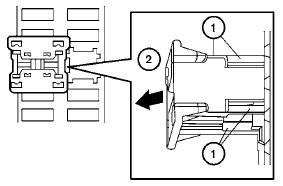
How to replace the extended storage switch:
1. To remove the extended storage switch, be
sure the ignition switch is in the OFF or
LOCK position.
2. Be sure the headlight switch is in the OFF
position.
3. Remove the fuse box cover.
4. Pinch the locking tabs 1 found on each
side of the storage switch.
5. Pull the storage switch straight out from the
fuse box 2 .
See also:
Call
Name (speak name) A
If there are entries stored in the phonebook, a
number associated with a name and location
can be dialed.
See “Phonebook (phones without automatic
phonebook download fu ...
Capacities and recommended fuel/lubricants
The following are approximate capacities. The actual refill capacities may be
slightly different. When refilling, follow the procedure
described in the “Maintenance and do-it-yourself” section ...
Moving to a steep uphill
Moving to a steep uphill
When moving the vehicle up a hill, the distance
guide lines and the vehicle width guide lines are
shown closer than the actual distance. For
example, the display show ...