
Front power seat adjustment
Operating tips:
- The seat motor has an auto-reset overload protection circuit. If the motor stops during operation, wait for a while, then reactivate the switch.
- Do not operate the power seat for a long period of time when the engine is off. This will discharge the battery.
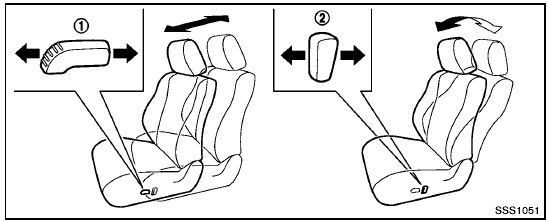
Forward and backward:
Moving the switch 1 forward or backward will slide the seat forward or backward to the desired position.
Reclining:
Move the recline switch 2 backward until the desired angle is obtained. To bring the seatback forward again, move the switch 2 forward.
The reclining feature allows adjustment of the seatback for occupants of different sizes for added comfort and to help obtain proper seat belt fit. (See “Precautions on seat belt usage” later in this section.) Also, the seatback can be reclined to allow occupants to rest when the vehicle is stopped and the transmission in the P (Park) position with the parking brake fully applied.
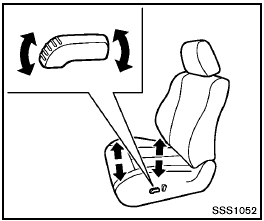
Seat lifter (if so equipped):
Pull up or push down the adjusting switch to adjust the height of the seat.
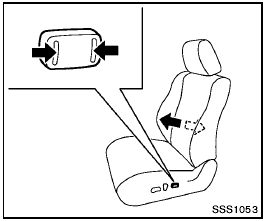
Lumbar support (if so equipped):
The lumbar support feature provides lower back support to the driver.
Push the front or back end of the switch to adjust the seat lumbar area.
See also:
Anti-lock Braking System (ABS)
● The Anti-lock Braking System (ABS) is a
sophisticated device, but it cannot prevent
accidents resulting from careless
or dangerous driving techniques. It can
help maintain vehicle ...
California proposition 65 warning
Engine exhaust, some of its constituents,
and certain vehicle components
contain or emit chemicals known to the
State of California to cause cancer and
birth defects or other reproductive ...
MODE select switch (models without Navigation
System)
Push the MODE select switch to change the
mode in the following sequence.
AM→FM*→SAT** (if so equipped)→CD***→ USB/iPod*** (if so equipped) → AUX*** → AM
* When ...