
“Recent Calls”
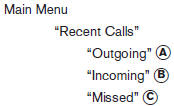
Use the Recent Calls command to access outgoing, incoming or missed calls.
“Outgoing” A
Use the Outgoing command to list the outgoing calls made from the vehicle.
“Incoming” B
Use the Incoming command to list the incoming calls made to the vehicle.
“Missed” C
Use the Missed command to list the calls made to the vehicle that were not answered.
See also:
Manual command selection
Commands can be selected manually. While the
commands are displayed on the audio screen,
select a command by operating the audio tuning
switch, and then push the switch.
Once a
command is m ...
SENSE AND STYLE
Family Friendly (Not Really, Fair, Great, Excellent): Great
Fun-Factor (None, Some, Good Times, Groove-On): Groove on and on! ...
Anti-lock Braking
System (ABS)
warning light
or
When the ignition switch is placed in the ON
position, the Anti-lock Braking System (ABS)
warning light illuminates and then turns off. This
indicates the ABS is operational.
If the ABS warn ...