
Cruise control
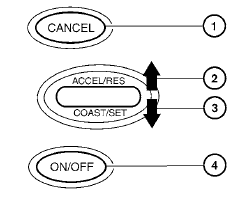
1. CANCEL switch
2. ACCEL/RES switch
3. COAST/SET switch
4. ON/OFF switch
See also:
Receiving a call
When you hear the ring tone, press the
button on the steering wheel.
Once the call has ended, press the
button
on the steering wheel.
NOTE:
If you do not wish to take the call when you
...
Air cleaner
QR25DE
NOTE:
The air cleaner filter should not be cleaned
and reused.
Replace the air cleaner filter according to the
maintenance log shown in the “Warranty Information
and Maintenance Bookl ...
Programming trouble-diagnosis
If the HomeLink does not quickly learn the handheld
transmitter information:
- replace the hand-held transmitter batteries
with new batteries.
- position the hand-held transmitter with its
bat ...