
Extended storage switch (if so equipped)
NOTE:
The extended storage switch is used for long term vehicle storage. Even if the extended storage switch is broken it is not necessary to replace it. Replace only the open fuse in the switch with a new fuse.
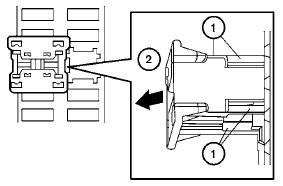
How to replace the extended storage switch:
1. To remove the extended storage switch, be
sure the ignition switch is in the OFF or
LOCK position.
2. Be sure the headlight switch is in the OFF
position.
3. Remove the fuse box cover.
4. Pinch the locking tabs 1 found on each
side of the storage switch.
5. Pull the storage switch straight out from the
fuse box 2 .
See also:
Waxing
Regular waxing protects the paint surface and
helps retain new vehicle appearance. Polishing
is recommended to remove built-up wax residue
and to avoid a weathered appearance before
reapplying ...
Wheels
Wash the wheels when washing the vehicle to
maintain their appearance.
- Clean the inner side of the wheels when the
wheel is changed or the underside of the
vehicle is washed.
- Inspect wheel ...
Heated seat (if so equipped)
The front seats are warmed by built-in heaters.
1. Start the engine.
2. Push the low or high position of the switch,
as desired, depending on the temperature.
The indicator light in the switch w ...