
Push-Button Ignition Switch
WARNING
Do not operate the push-button ignition switch while driving the vehicle except in an emergency. (The engine will stop when the ignition switch is pushed 3 consecutive times in quick succession or the ignition switch is pushed and held for more than 2 seconds.) If the engine stops while the vehicle is being driven, this could lead to a crash and serious injury.
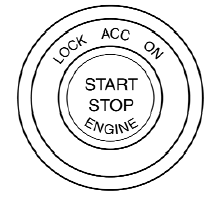
When the ignition switch is pushed without depressing the brake pedal (CVT) or the clutch pedal (M/T), the ignition switch position will illuminate as follows:
Push center
● once to change to ACC.
● two times to change to ON.
● three times to return to OFF.
The ignition switch will automatically return to the LOCK position when any door is either opened or closed with the switch in the OFF position.
The ignition lock is designed so that the ignition switch position cannot be switched to OFF until the shift selector is moved to the P (Park) position (CVT) or N (Neutral) position (M/T).
When the ignition switch cannot be pushed toward the OFF position, proceed as follows:
1. Move the shift selector into the P (Park)
position (CVT) or N (Neutral) position (M/T).
2. Push the ignition switch. The ignition switch
position will change to the ON position.
3. Push the ignition switch again to the OFF
position.
The shift selector can be moved from the P (Park) position if the ignition switch is in the ON position and the brake pedal is depressed.
If the battery of the vehicle is discharged, the push-button ignition switch cannot be moved from the LOCK position.
Some indicators and warnings for operation are displayed on the vehicle information display. See “Vehicle information display” in the “Instruments and controls” section.
See also:
Continuously Variable Transmission (CVT)
The ignition lock is designed so that the ignition
switch cannot be turned to the LOCK position
until the selector lever is moved to the P (Park)
position.
- When turning the ignition switch to ...
Opening the trunk lid
Opening the trunk lid
1. Push the trunk opener request switch A for
more than 1 second while carrying the Intelligent
Key with you.
2. The trunk will unlatch. A chime will sound 4
times.
3. ...
Air flow charts
The following charts show the button and dial
positions for MAXIMUM AND QUICK heating,
cooling or defrosting. The air recirculation
button should always be in the OFF position
for heating and ...