
How to use the SETTING button
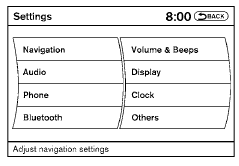
When the SETTING button is pressed, the Settings screen will appear on the display. You can select and/or adjust several functions, features and modes that are available for your vehicle.
See also:
New V6 diesel engine
The new direct injection V6 turbodiesel has been developed by the Renault
Nissan Alliance to deliver high levels of performance with strong economy,
competitive emissions and class-leading refinem ...
Parking brake break-in
Break in the parking brake shoes whenever the
stopping effect of the parking brake is weakened
or whenever the parking brake shoes and/or
drums/rotors are replaced, in order to assure the
best ...
Trailer towing tips
In order to gain skill and an understanding of the
vehicle’s behavior, you should practice turning,
stopping and backing up in an area which is free
from traffic. Steering stability, and braki ...